Retail shops
Grocery stores, supermarkets & boutiques
Barcode billing, variants and stock.
Create bills. Keep stock in check.
Stay on top of customer dues.
One Plus Billing makes the everyday easier — for your shop, restaurant or service business.
Latest app · v1.0.24 · Safe reset & improved pop-ups
Find your business below.
See the tools you get, then try its free demo.
Grocery stores, supermarkets & boutiques
Barcode billing, variants and stock.
Dealers, distributors & bulk suppliers
Bulk rates, credit sales and collections.
Medical shops & pharmacies
Medicine details, batches and expiry.
Designers, developers & consultants
Quotes, projects and milestone payments.
Vehicle repair & service centres
Job cards, parts and labour billing.
Dine-in, takeaway & café counters
Menu items, add-ons and food bills.
Phone, accessory & electronics shops
Device and serial-number billing.
Salons, spas & beauty studios
Appointments, services and packages.
Shops selling products and services
Flexible items, services and expenses.
Pick your business type in app Settings. The tools change to match the work you do.
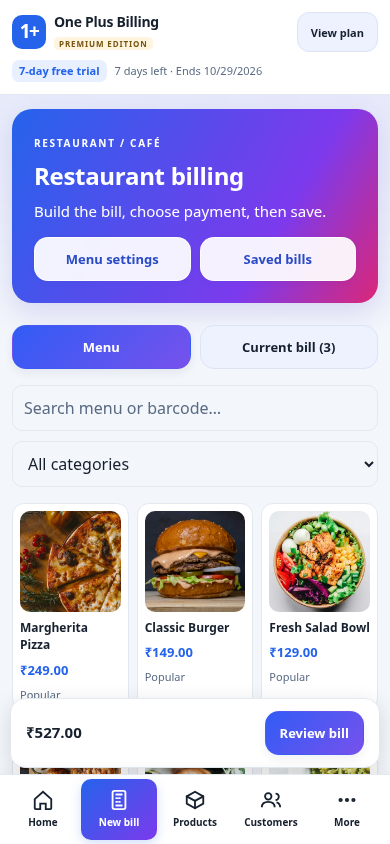
Restaurant shown with sample data. Phone and computer keep separate local records; automatic sync is not included.
Take 7 days to try your workflow,
your printer and your first few bills.
₹198 less than 12 monthly payments
Buy or renew inside the app. Check the final amount and any applicable charges before payment.
Don’t start with a blank screen. Explore 100 sample entries for your business.
Each pack includes sample details and labelled illustrations. Goods start with quantity 100; services have no stock.
Dine-in, takeaway & café counters
Menu items, add-ons and food bills.
Read the restaurant guideExport a backup first. Import the Images ZIP directly without extracting, review the mapping and continue. Salon entries go into its service catalogue. Replace sample prices, taxes and business details before real billing.
To remove it: Settings → Remove demo data → Review demo items → Download backup & remove. Uncheck anything to keep. The app verifies a full backup before removing eligible demo entries. Existing bills, payments and referenced items are retained. If backup fails or you cancel, removal stops.
Requires v1.0.21+. Backups save to Downloads/OnePlusBilling on Android 10+ and Windows. Android 8/9 asks for a location. Photo-only edits do not automatically protect a demo item.
Clear English. Real app screenshots.
Simple steps you can follow at your own pace.
Set up your business, try a sample bill and check the result. Each business has its own chapter, with useful examples and everyday checks.
Pick a quick 3-page guide, or read its chapter online.
Sell quickly. Keep stock clear.
From bulk order to collection.
Work by medicine, batch and expiry.
Keep work, approvals and billing together.
Receive. Approve. Repair. Deliver.
A clear bill for every order.
Track the device as well as the sale.
Book a visit. Bill it once.
Simple billing for mixed businesses.
Includes setup, daily steps and result checks. Screens use sample data; labels may vary by app version.
Download Android or Windows.
Install it on your device.
Start your free trial online.
Pick your business and add your details.
Try a demo or add your own items.
Test printing and save a backup.
Update to v1.0.24, then open More → Settings → Reset business data. Review the popup, type DELETE and tick the confirmation. Choose Save backup & delete all business data.
The app saves and verifies a full backup, including product photos and held bills, before deleting anything. If the backup is cancelled or fails, your data stays. Cancel the popup to keep working.
This removes all real and demo business records across all nine business types on this device. Your business details, logo, settings, owner PINs, bill numbering and licence/trial are kept. Existing backup copies are also kept. It does not reset your other device. Recover records by restoring a backup.
Only removing unused demo items? Use Settings → Remove demo data instead. When updating, install over the existing app; do not uninstall or clear its storage.
Open pop-ups block taps and scrolling on the page behind them. More tools has a Close button. On Android, Back closes the popup before navigating to a previous page.
Yes, after activation. Connect once to start a trial or paid licence, then bill offline until expiry. Purchase, renewal and activation on another device require internet.
Each device keeps its own local records. Automatic sync is not included. Paid plans allow 2 devices; activate each through the supported licence flow.
Use Android/Windows system printing or a supported ESC/POS thermal printer. Model, driver and connection determine compatibility. Test your printer during the 7-day trial.
Windows 10/11 x64 with WebView2. The installer is not publisher-signed, so Windows may show “Unknown publisher”. Verify the download source and back up before updating.
You can import your own product photos and details. A bill’s UPI QR helps customers pay, but does not automatically verify receipt. Check your bank/payment app before marking a bill paid.
WhatsApp 7736882381 · 9 AM–6 PM IST